
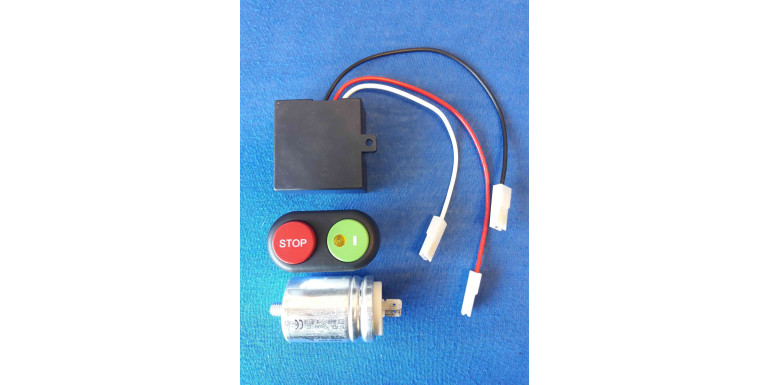
Slicer won't start or keeps stopping: electrical faults
When a meat slicer won't start, the fault is usually upstream of the motor: the socket or cord, the on/off switch or push-button panel, a safety microswitch left open (blade cover, sharpener, carriage) or a tripped thermal cut-out. If the motor hums but the blade doesn't turn, the prime suspect on 230 V single-phase machines is the run capacitor. Below you'll find each symptom, its likely causes, what you can check yourself with the machine unplugged, and when to call a technician.
This guide is about diagnosis. For actual motor repair (rewinding, 220 or 380 V) see our article on 220/380 V motor repair; for collection and repair in Rome and Lazio see the page on slicer repair and service in Rome.
First rule: what you can check yourself and what you can't
A slicer has a razor-sharp blade and live parts, so anything beyond looking and listening is done with the plug pulled. Without special tools you can check:
- the socket, plug and power cord (crushed, scorched or exposed wires);
- that the blade cover, sharpener and carriage are fitted and locked in place;
- that the thickness dial is at zero, if your model's manual requires it for start-up;
- how clean the carriage rails are, belt tension, and noises when turning the blade by hand (cut-resistant gloves, plug out).
Leave the rest to an electrician or service centre: opening the switch panel or motor housing, measuring voltages, testing the capacitor, replacing boards and relays. Above all, never bypass a microswitch with a jumper or tape. Those contacts stop the blade from spinning without its guards; defeating them makes the machine dangerous and non-compliant.
Slicer won't start: the most common causes
If you press start and nothing happens (no hum, no light), work from the outside in.
Power supply, plug and cord
Test the socket with another appliance and check the RCD or breaker in the panel. Three-phase 380/400 V machines need the right socket and supply: with one phase missing the motor may not start or may just hum. A cord crushed under the counter or split near the plug must be replaced, not taped.
Slicer on/off switch and push-button panel
The slicer switch is one of the parts that wears fastest: it's pressed dozens of times a day, often with greasy hands. Many commercial slicers use a panel with a green start and red stop button plus a no-volt release coil: after a power cut the machine won't restart by itself and must be switched on again. If the green button won't latch (the blade only runs while you hold it) or no longer clicks, the fault is almost always in the switch assembly. See push-button panels for slicers and meat grinders; one of our best sellers is the 6-contact switch with LED fitted to many RGV slicers.
Safety microswitches
Many models have one or more microswitches that prevent start-up if the blade cover, sharpener or carriage is not correctly in position. This is the most common and most trivial cause after cleaning: a part refitted "almost" in place. Refit it carefully and try again. If everything is seated and it still won't start, the microswitch may be dirty, misaligned or broken: replace it with an identical one (microswitches, magnets and sensors), never remove it.
Motor thermal protection
Many single-phase motors have a thermal protector that cuts power when the winding overheats. Depending on the model it resets itself once cool or via a small reset button. If the slicer stopped after heavy use, unplug it and let it cool before trying again.
Electronic board and relays
Newer slicers have an electronic control board handling low-voltage controls, relays and interlocks. Typical signs: indicator lit but motor dead, intermittent starts, buttons that stop responding after a storm or water ingress. Diagnosis needs instruments; pick the replacement by brand and model among our electronic boards for slicers. For several RGV models there is a board, push-button and capacitor kit that replaces the whole control group.
Slicer motor hums but the blade won't turn
A hum without rotation means the motor is getting power but can't start. Switch off straight away: persisting overheats the winding.
- Slicer capacitor: on 230 V single-phase motors the capacitor provides the phase shift that gets the motor turning. As it loses capacitance the motor hums, starts only if you nudge the blade, or starts sluggishly and runs hot. The microfarad (µF) rating and voltage are printed on the body and the replacement must match both. See capacitors for slicers and meat grinders. Three-phase motors have no capacitor.
- Seized bearings or a dragging blade: with the plug out, the blade should spin freely. If it feels stiff or grinds, the problem is mechanical (bearings, debris under the blade ring guard).
- Belt: if the motor runs but the blade doesn't, or you hear slipping, the belt is loose or broken.
Slicer starts then stops
If the machine cuts out after a few minutes and only restarts after a pause, the thermal protection is usually tripping. Look for whatever is making the motor work too hard: a dull blade, an over-tight belt, dragging bearings, a weak capacitor, product too cold or hard for the machine's power, or low supply voltage. If it keeps cutting out even under light load, the winding may be damaged: that's covered in the article on motor repair, and replacements are in slicer motors and stators.
Noisy or vibrating slicer
A whine or rumble that gets worse over time is the classic sign of worn motor or blade bearings. A rhythmic slapping points instead to a worn belt or loose pulley. Either way, act early: a failing bearing can damage the shaft and turn a cheap part into a major repair. A metallic scraping of the blade against its ring guard calls for adjustment or a check of the blade itself.
If the belt is the culprit, our slicer belt guide explains how to identify, measure and replace it.
Slicer carriage stiff or stuck
A stiff slicer carriage isn't an electrical fault, but it's often mistaken for a motor problem because the machine seems to struggle. The causes are nearly always mechanical:
- rails clogged with fat and residue, or dry: clean them and lubricate with food-grade white oil, as explained in our slicer maintenance guide;
- worn carriage bushings or bearings: the carriage has play, catches or moves jerkily (slicer carriage bearings);
- a locking knob not fully released, or a carriage microswitch holding it when it's out of position.
A carriage that's jammed after a knock or fall may have a bent rail: that's a job for a technician.
Troubleshooting table: symptom, likely cause, part
| Symptom | Likely cause | What to check | Typical part |
|---|---|---|---|
| Won't start, no sign of life | Supply, cord, switch | Socket, breaker, cord (unplugged) | Cord, switch, push-button panel |
| Won't start after cleaning | Safety microswitch open | Blade cover, sharpener and carriage seated | Microswitch (only if faulty) |
| Runs only while button is held | Switch panel or hold-in coil | Technician | Complete push-button panel |
| Light on, motor dead | Control board or relay | Technician | Electronic board, relay |
| Hums, won't turn (230 V) | Capacitor, bearings | Blade free by hand (unplugged) | Capacitor, bearings |
| Starts then stops | Thermal cut-out from overload | Sharpness, belt, bearings | Depends on cause; stator if damaged |
| Noise or vibration | Bearings, belt | Hand-turn noise, belt tension | Bearings, belt |
| Carriage stiff or stuck | Dirty/dry rails, bushings | Clean and lubricate | Bushings, carriage bearings |
Quick checklist before calling for service
- Unplug the slicer and wait for the blade to stop.
- Check the socket, the breaker panel and the cord.
- Make sure the blade cover, sharpener and carriage are fitted and locked.
- If it stopped during use, let it cool for at least a few tens of minutes.
- Turn the blade by hand with gloves on: it should be free and quiet.
- Note the exact symptom (silence, hum, click, indicator light) and the rating plate data: brand, model, voltage, serial number.
- If the fault persists, call a technician: don't open the electrics and don't bypass safety devices.
Slicer repair: what drives the cost
The cost of repairing a slicer can't be quoted blind, but it comes down to a few clear factors: diagnosis time, the part involved (a capacitor or microswitch costs far less than a control board or stator), parts availability for that model, the choice between original and aftermarket parts, rewinding versus replacing the motor and, if needed, collecting the machine. Describing the symptom precisely and supplying the rating plate data shortens diagnosis.
Frequently asked questions
Why won't my meat slicer turn on?
In order: power supply (socket, breaker, cord), a part not seated that leaves a safety microswitch open, a worn switch or button panel, a tripped thermal cut-out. If all of these check out, the fault is in the control board or motor and needs a technician.
How do I know if the slicer capacitor has failed?
The typical sign is a motor that hums without starting, or starts only when you give the blade a push. Sometimes the capacitor is visibly swollen. A definite test needs a capacitance meter with the machine unplugged; leave it to an electrician, as a capacitor can hold a charge.
Can I replace the slicer switch myself?
Only if you have electrical skills: the new switch must have the same number of contacts and wiring layout, and the connections must be redone exactly. If in doubt, hand it to an electrician or service centre.
Why is my slicer carriage hard to push?
Almost always dirty or unlubricated rails, or worn carriage bushings and bearings. Clean the rails and lubricate them with white oil; if it stays stiff or has play, the sliding parts need replacing.
Is it worth repairing a slicer motor or replacing it?
It depends on the damage and the machine's value: a burnt winding can be rewound or the stator replaced. We cover this in detail in the 220/380 V motor repair article.
Conclusion
Most cases of a slicer that won't start are solved with simple checks and a targeted part: switch, capacitor, microswitch or board. When diagnosis means opening the electrics, leave it to people who do it every day: see our slicer repair and service in Rome and Lazio.